

Every time we open a website, much more happens than what appears on the screen.
We see a page loading, a cookie banner, maybe an article, a product page, a login form, or a video. But behind that visible layer, the browser may be communicating with many different third parties: analytics platforms, advertising networks, tracking pixels, social widgets, anti-fraud systems, content delivery networks, consent platforms, remarketing tools, and scripts designed to measure how we interact with the page.
The uncomfortable part is that most of this is invisible.
We usually notice privacy only when we explicitly give something away: an email address, a phone number, a name, a shipping address, a payment method. But online tracking often works in a quieter way. A website can collect or transmit information such as your IP address, browser type, device model, screen size, language, approximate location, referrer, pages visited, time spent on the page, clicks, scroll depth, and interactions with forms or buttons.
Individually, some of these details may look harmless. Together, they can become a profile.
And profiles are valuable. Data is now one of the core currencies of the internet. It is used to measure, personalize, advertise, recommend, predict, rank, segment, and sometimes manipulate. It helps companies understand what we do, what we might want, what we are likely to buy, and how we behave across different websites and apps.
The real issue is not simply whether we have “something to hide.” The better question is: do we actually know who is watching, what they are collecting, and where that data goes?
Most of the time, the answer is no.
There is no single magic tool that reveals everything. Some tracking happens directly in the browser. Some happens server-side. Some relies on cookies. Some uses fingerprinting. Some is linked to accounts, logins, apps, pixels, or third-party scripts. Some information can be inspected technically, some can be seen through privacy dashboards, and some may only be accessible through formal data access requests.
But that does not mean we are powerless.
There are free tools that make this invisible layer easier to understand. They will not show every internal decision a company makes about your data, but they can reveal a lot about what happens when you visit a website and which third parties may be involved.
This is where privacy tools become useful: not as a perfect shield, but as a way to stop browsing completely in the dark.
Blacklight by The Markup: a privacy scanner for websites
One of the easiest tools to start with is Blacklight, created by The Markup.
Blacklight works like a privacy inspector for websites. You enter the address of a website, launch the scan, and it generates a readable report about tracking technologies detected on that page.
The great thing about Blacklight is that it does not require you to install anything or manually inspect network traffic. You do not need to open developer tools, export HAR files, analyze requests, or interpret dozens of domains by hand. You simply paste a URL and get a first look at what may be happening behind the scenes.
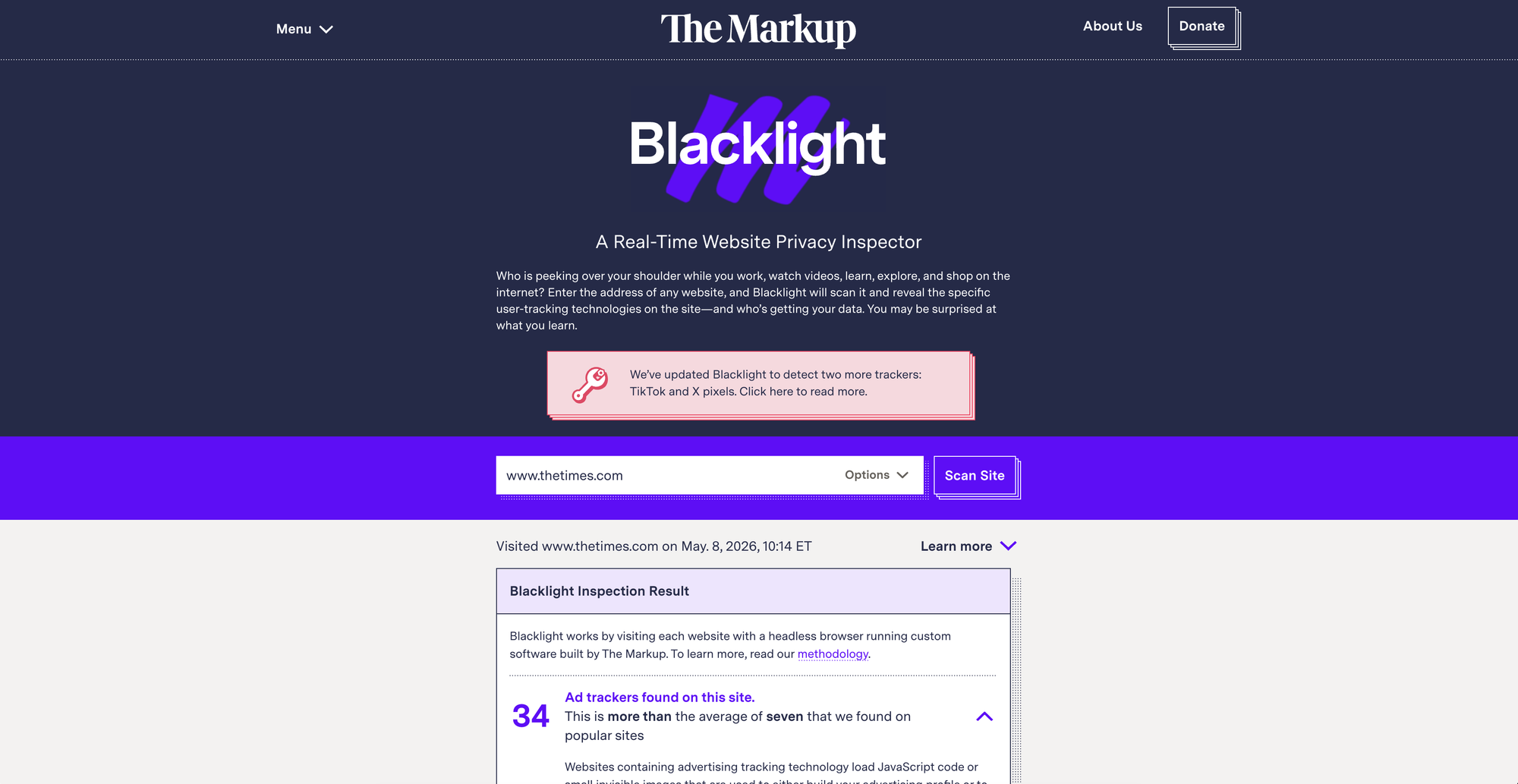
Blacklight can detect several common tracking techniques, including ad trackers, third-party cookies, tracking pixels, and other technologies used to monitor users across the web. It is especially useful when you want to check a website before trusting it, creating an account, entering personal information, or simply browsing it regularly.
It is not a perfect audit. A website may behave differently depending on your country, browser, cookie choices, login status, device, or the specific moment of the scan. Blacklight also cannot tell you everything a server stores internally after receiving your request.
But as a first check, it is excellent.
It answers a very practical question: before I browse this site, who might be watching?
And most importantly: Blacklight is free.
Ghostery: seeing trackers while you browse
If Blacklight is useful before visiting or trusting a specific site, Ghostery is useful while browsing every day.
Ghostery is a free browser extension designed to block ads, trackers, cookies, pop-ups, and other tracking technologies. It gives you a more visible way to understand what is happening on the websites you visit. Instead of manually reading network requests, you can open the Ghostery panel and see which trackers have been detected and blocked.
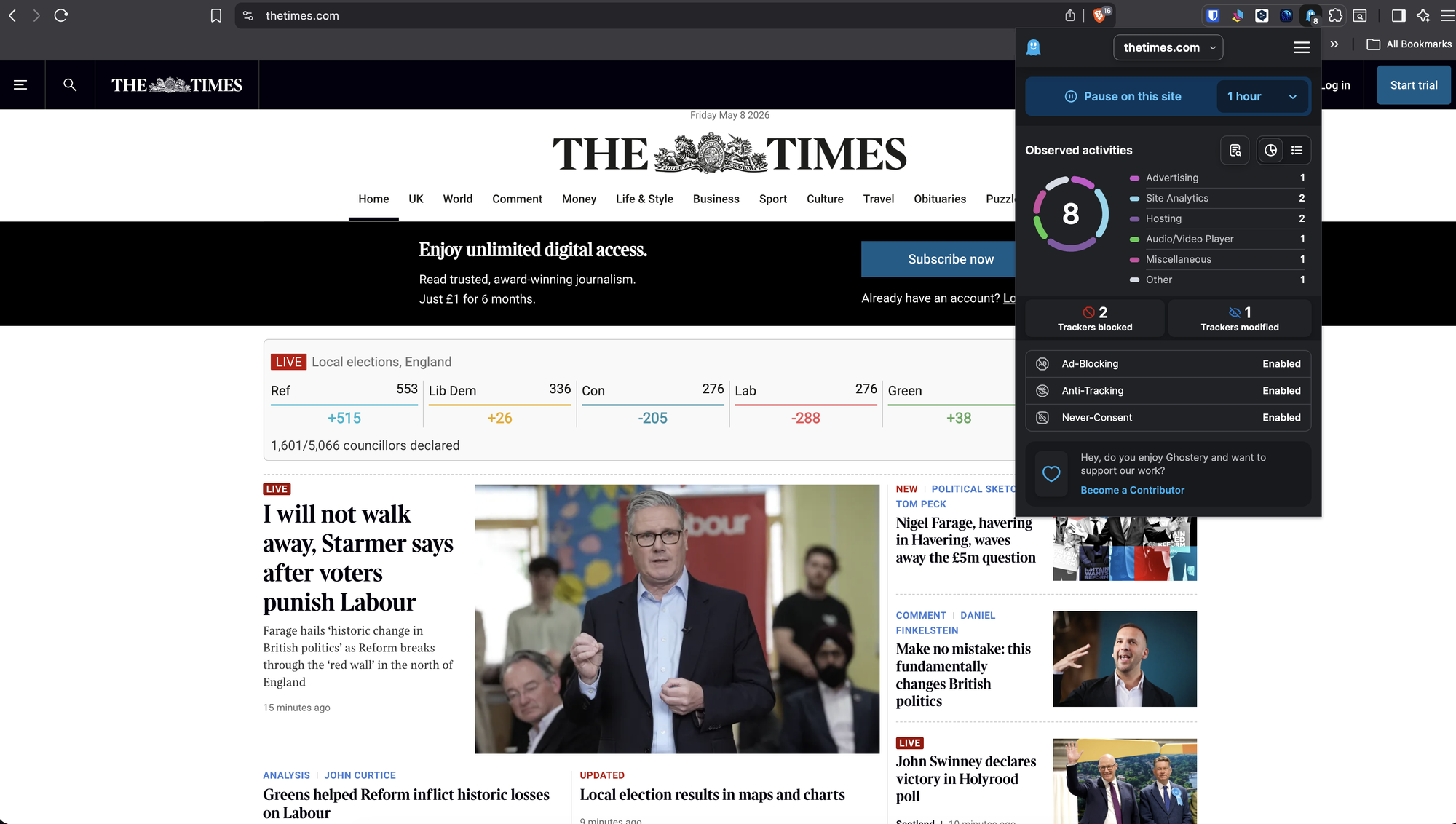
This is what makes Ghostery interesting: it is not only a protection tool, but also an awareness tool.
After using it for a while, you start noticing patterns. Some websites load only a few third-party services. Others contact a surprisingly large number of advertising and analytics systems. News websites, e-commerce platforms, comparison sites, and content-heavy pages often become much more revealing once you can actually see the tracking layer behind them.
Ghostery makes that layer understandable. It translates a complex technical reality into something closer to normal language: ads, trackers, analytics, social media widgets, and other categories of third-party activity.
It will not tell you everything a website knows about you. But it helps answer another useful question: who is trying to track me on this page right now?
For daily browsing, Ghostery is simple, visual, and free.
Brave: privacy protection built into the browser
Another very practical solution is Brave.
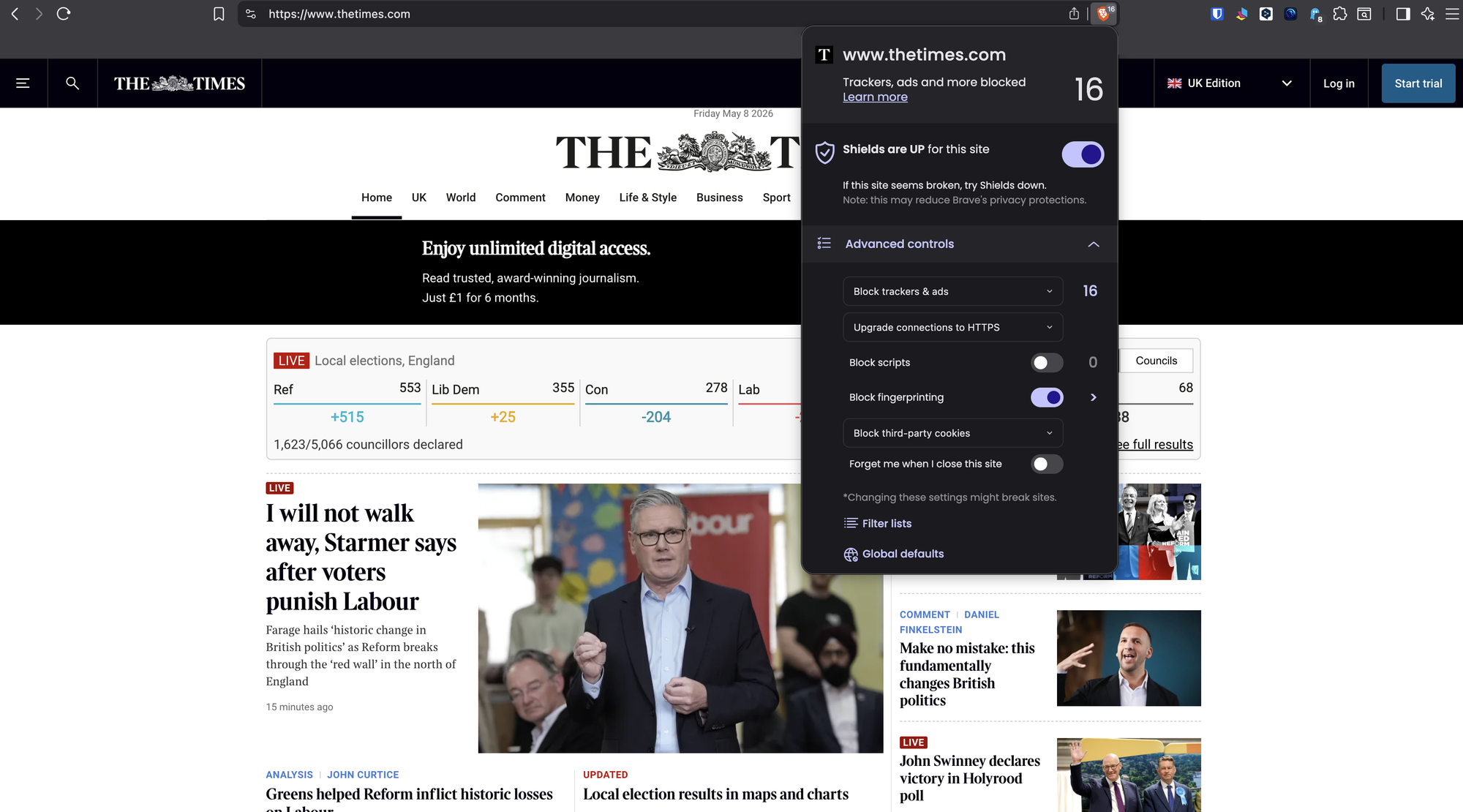
Unlike Ghostery, Brave is not just an extension. It is a full browser with privacy protections built in by default. Its main protection system is called Brave Shields, and it blocks many of the elements that follow users around the web, including trackers, cross-site cookies, certain fingerprinting techniques, phishing attempts, and ads.
This makes Brave especially convenient for people who want privacy protection without building a complex setup. You do not need to install a separate ad blocker, configure multiple lists, or remember to activate advanced settings. You install the browser and, from the first page you visit, protections are already active.
Brave also gives immediate feedback. Its Shields panel shows blocked trackers and ads, so you can see that the page is not as simple as it may look. That little counter becomes surprisingly educational: it reminds you that web pages are often surrounded by invisible infrastructure.
Another strong point is control. If a site breaks or you trust a specific domain, Brave Shields can be disabled for that site. You can also change protection levels depending on how strict you want the browser to be. This matters because privacy tools always involve a trade-off: stronger blocking can sometimes interfere with website functionality.
For many users, Brave is probably the most convenient “set it and use it” solution.
It makes privacy protection feel less like a technical project and more like a normal browsing experience.
And yes: Brave is free.
Privacy Badger: quiet protection from the EFF
Another free tool worth knowing is Privacy Badger, developed by the Electronic Frontier Foundation.
Privacy Badger is a browser extension designed to stop advertisers and third-party trackers from secretly following you across the web. Its approach is less flashy than Ghostery and less browser-centric than Brave, but it is very valuable for people who want a simple, low-maintenance protection layer.
The idea is straightforward: install it and let it work in the background.
Privacy Badger is especially focused on third-party tracking across multiple websites. If a tracker appears to be following you from site to site without permission, Privacy Badger can block it from loading further content in your browser.
It is not mainly designed as a beautiful dashboard. It is more of a quiet defensive layer. That makes it useful for users who do not want to spend time managing long lists of trackers or making constant decisions.
If you want a free, trustworthy, install-and-forget privacy extension, Privacy Badger is a strong option.
So, which tools should you use?
The best choice depends on the goal.
If you want to check a website before browsing it, use Blacklight. It gives you a quick privacy report without installing anything.
If you want to see trackers while browsing, use Ghostery. It is visual, immediate, and useful for understanding what happens page by page.
If you want a browser with privacy protections already built in, use Brave. It is probably the smoothest option for everyday use because blocking happens automatically in the background.
If you want an additional, quiet layer against cross-site tracking, consider Privacy Badger.
Personally, my preferred setup is Brave + Ghostery for everyday browsing, and Blacklight when I want to inspect a website before visiting it or before trusting it with more attention.
This combination feels practical because the browsing experience remains fluid, fast, and almost automatic. Brave blocks a large amount of tracking directly at the browser level, while Ghostery gives me extra visibility into what is being detected and blocked. If something breaks, protections can be disabled easily for a specific domain, or turned off more broadly when necessary.
There is also a very noticeable side effect: most online advertising simply disappears.
That is not just a cosmetic benefit. Removing ads often makes pages cleaner, faster, less distracting, and less aggressive. Many ads are tied to tracking systems, so blocking them is not only about convenience; it is also about reducing the number of third parties that get a chance to observe your browsing.
The real goal is not paranoia. It is awareness.
Using these tools does not mean believing that every website is malicious. Many tracking systems exist for understandable reasons: analytics, performance measurement, fraud prevention, advertising, personalization, or funding free content.
The problem is not that data exists. The problem is opacity.
Users should be able to understand when they are being tracked, who is involved, and how much control they have. Without visibility, consent becomes weak. Without control, privacy becomes theoretical.
Tools like Blacklight, Ghostery, Brave, and Privacy Badger help restore some of that visibility and control.
They are not perfect. They do not reveal everything. They cannot tell you every internal database entry, every server-side inference, or every marketing segment associated with your identity.
But they do something important: they make the hidden web visible enough for ordinary users to act.
And that is a very good place to start.